


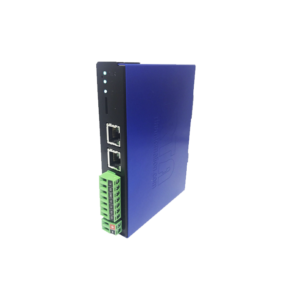
460BCAZR
$NZD1535 - $NZD1745
Please note, site orders are made via credit card. Please contact sales@techstep.co.nz if you require support to purchase directly.
Product Description
Connect BACnet/IP Server Devices to Microsoft Azure
The 460 BCAZR moves data between up to 32 BACnet/IP devices and Microsoft Azure. Connect your BACnet/IP devices to the Microsoft Azure platform. Allowing you to easily log data and leverage in populating dashboards. The 460BCAZR delivers BACnet analog and binary data to Microsoft Azure in a JSON format. Best of all, the product comes with 5-year warranty.
How Do I Use the 460BCAZR in My Application?
Analog and binary BACnet data value can be sent as Device-To-Cloud messages or received as Cloud-To-Device messages. SSL transport layer security protects the data moving from your operations network to the cloud.
Why Use Real Time Automation as a Gateway Supplier?
While there are certainly other companies offering protocol gateways, there is no one who provides the level of support and service that you receive from RTA. When you call, a live person answers the phone. When you talk with sales, you will get honest answers and recommendations. When you get support, it is from an engineer who had a hand in the product’s development, and support doesn’t require a ticket or 24-hour wait.
BACnet/IP Client Features
BACnet/IP Operation Modes: BACnet/IP ClientSupported Object Types: Device, BI/BO/BV, AI/AO/AV, MI/MO/MV, Character String Value
Supported Service Codes: Read Property-A, Read Property Multiple-A, Write Property-A, Write Property Multiple-A, Device Dynamic Binding-A
Maximum Connections: 32
Number Read/Write Scan Lines per Device: 200 Total - 100 reads and 100 writes
Scan Line Support: Up to 128 Objects
Microsoft Azure Features
- AZR Operation Modes: Microsoft Azure
- Maximum Broker Connections: 1 AZR
- Maximum Data Points Per Connection: 250 Read and 1 Write Topics
- Security: SSL certificate based cloud access
- Supported Data Formats: JSON
- Data Payload: Topic Name and Value
Gateway Security
You can configure a user with access to diagnostic and configuration screens.
Status and Counters
Protocol-specific status, counters and error messages are accessible within the gateway's diagnostics page.
Diagnostic Logging Page
Allows users to see and log start up sequences, protocol-specific messages and error messages.
Related Resources


OUR COMPLETE SATISFACTION GUARANTEE

Every RTA gateway provided by Tech Step comes with a 30 DAY 100% SATISFACTION GUARANTEE. If an application falls through, you find an alternative, or if you just wanted to try out a gateway -if for any reason you are not 100% satisfied, you can return the unit for a refund of the purchase price.
In addition, every gateway comes with a 5 YEAR BETTER THAN INSURANCE WARRANTY.You will never have to blame the dog for eating your gateway. We don’t care if you let out the magic black smoke confusing AC with DC power or if you run the unit over with a forklift. Even if you break it, we will fix it or replace it at no cost for 5 years after purchase. That’s the RTA way.